
Tokenized Stock Maker/Taker Fee Ranking: Comparing Explicit Trading Costs
Author: Flowie|ChainCatcher content author, focusing on RWA, interpreting the true narrative of Web3.
The Maker/Taker handling fees of tokenized stock exchanges are suitable for answering "under the page display rules, which explicit rate is worthy of further study", but are not suitable for directly answering "which exchange is cheaper for any order". The reason is simple: whether the order is executed as Maker or Taker, whether the target contract is applicable, which rate bracket the account is in, as well as the price difference and actual execution at that time are all conditions at different levels.
This article uses the snapshots of 29 platforms frozen by RootData at 17:30 on July 23, 2026 as a starting point, fully retaining the Maker / Taker display values, interval values and --. Read the displayed rate correctly first, and then discuss the explicit charges under the same nominal amount; do not write it as account opening advice, platform endorsement or total cost ranking.
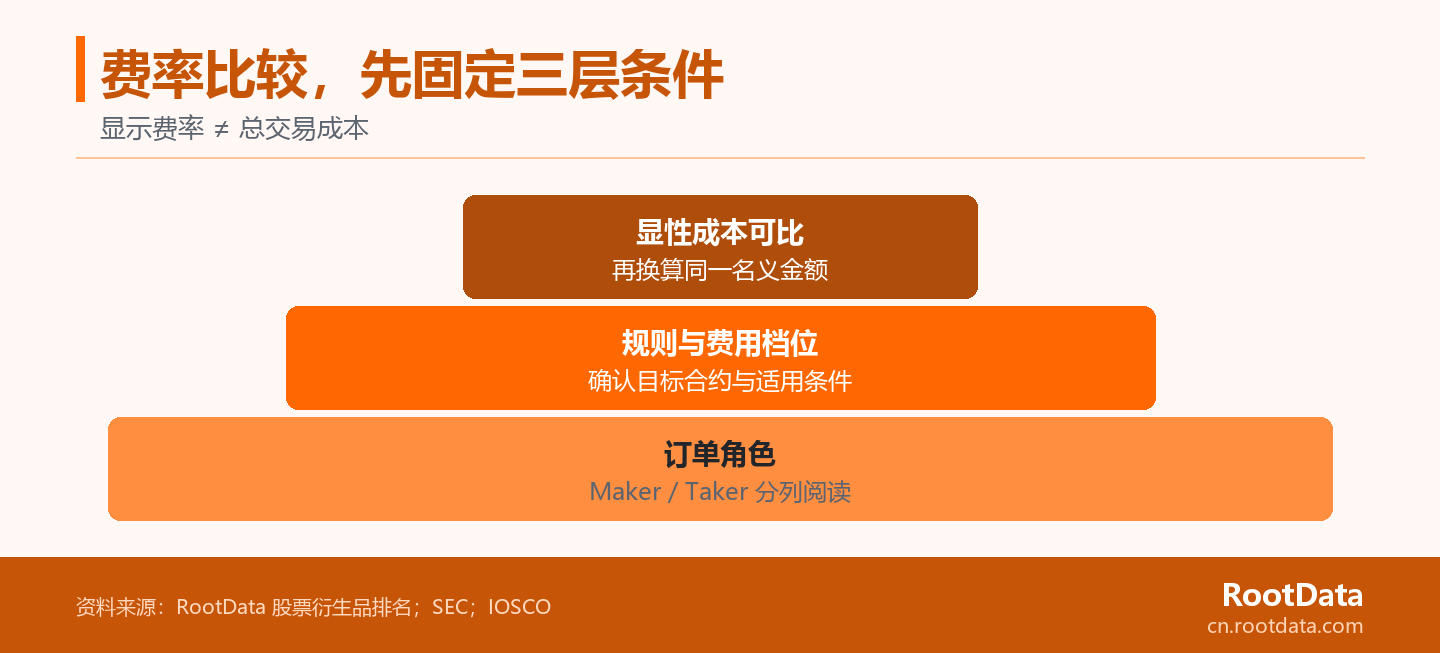
Three sequential conditions for cost comparison
- Separate the roles first: Maker and Taker are read separately to avoid mixing them into one "lowest rate".
- Recheck rules: The target contract, product rules and account level determine whether the displayed value is applicable.
- Finally calculated amount: The nominal amount is multiplied by the applicable rate to get only the unilateral explicit costs but not the total cost.
Maker / Taker fees, what to answer first and what not to answer
Maker / Taker reflects the liquidity role of the order. Maker refers to providing liquidity that can be matched by others, while Taker refers to consuming existing liquidity. SEC explanation of the maker-taker structure and its market structure data both tie fees or rebates to both types of roles. When placed in the page field of a tokenized stock exchange, the most important way to read it is: first sort, then compare; do not confuse Maker and Taker into one "minimum handling fee".
The fee field only answers explicit rates. It does not automatically cover bid-ask spreads, the price impact of order size, funding rates, or other carrying costs. SEC The discussion of transaction cost componentsalso considers spreads and market effects as distinguishable cost components. Therefore, a low fee is a signal that needs to be verified, rather than a conclusion that the full transaction cost is already lower.
First fix the order role and rule gear, so that the rate display can be meaningful; then record the quotation and holding cost separately, so that a column of handling fees will not be read as a total cost.
Snapshot of 29 tokenized stock exchanges: Maker / Taker rates shown on the page
The table below is in the order of frozen snapshots of the RootData page, fully retaining the Maker / Taker rates shown on the 29 tokenized stock exchanges. Data as of 2026-07-23 17:30, source RootData. The specific fields come from RootData stock derivatives exchange ranking page. The "snapshot serial number" here follows the page order and is not reordered by Maker or Taker rate.
Page original -- left as missing. -- in the table is not replaced by 0%; the Maker range of XT.COM is also retained as it is. RootData Stock Derivatives Ranking Description Treats fees, liquidity, spreads and contract coverage as separate fields, which is why this article does not produce a "lowest total cost exchange" conclusion.
| Snapshot serial number | Exchange | Maker | Taker | Meter reading prompt |
|---|---|---|---|---|
| 1 | Binance | -- | -- | Keep missing status |
| 2 | Bybit | 0% | 0.0275% | Column comparison |
| 3 | OKX | 0.02% | 0.05% | Column comparison |
| 4 | Bitget | 0.02% | 0.06% | Column comparison |
| 5 | Ourbit | 0.02% | 0.04% | Column comparison |
| 6 | Gate | -0.01% | 0.075% | Negative display values require verification rules |
| 7 | Hyperliquid | 0.015% | 0.045% | Column comparison |
| 8 | Lighter | 0% | 0% | Applicable conditions still need to be verified |
| 9 | BingX | 0.02% | 0.05% | Column comparison |
| 10 | XT.COM | 0.02% - 0.04% | 0.06% | Keep interval value |
| 11 | Ondo Perps | 0.015% | 0.035% | Column comparison |
| 12 | Extended | 0% | 0.025% | Applicable conditions still need to be verified |
| 13 | Phemex | 0.01% | 0.06% | Column comparison |
| 14 | Bitunix | 0.02% | 0.06% | Column comparison |
| 15 | GRVT | -0.0001% | 0.045% | Negative display values require verification rules |
| 16 | KuCoin | 0.02% | 0.06% | Column comparison |
| 17 | edgeX | 0.018% | 0.038% | Column comparison |
| 18 | MEXC | 0% | 0% | Applicable conditions still need to be verified |
| 19 | MSX | 0.02% | 0.045% | Column comparison |
| 20 | OrangeX | 0.02% | 0.06% | Column comparison |
| 21 | Coinbase | -- | -- | Keep missing status |
| 22 | Aster | -- | -- | Keep missing status |
| 23 | BitMart | 0.02% | 0.06% | Column comparison |
| 24 | HTX | 0.02% | 0.06% | Column comparison |
| 25 | BitMEX | 0.05% | 0.05% | Column comparison |
| 26 | Kraken | 0.02% | 0.05% | Column comparison |
| 27 | Crypto.com | -- | -- | Keep missing status |
| 28 | Paradex | 0% | 0.02% | Applicable conditions still need to be verified |
| 29 | Ostium | 0.06% | 0.06% | Column comparison |
This table is most suitable for two types of preliminary actions: one is to circle the display values worth studying in the Maker and Taker columns respectively; the other is to mark missing, interval or negative display values, leaving it to return to the specific rules for verification. It does not answer how much a personal account will actually be charged, nor does it explain the price at which a certain order will eventually be filled.
Change the displayed rate into a comparable cost and pass the three-layer conditions first
First fix the roles and rules, and then enter the displayed rate as an explicit cost. More specifically, the bottom layer is the order role, the middle layer is the target contract and fee bracket, and the top layer is the unilateral explicit fee under the same nominal amount; the quotation, slippage and capital cost are still recorded separately outside this "pyramid". Doing so will not create a seemingly accurate total cost score that is realistic but mixed with different conditions.
First level: fix the order role first
Different roles should not constitute the same rate comparison object. If you are studying orders that need to be executed immediately, you should only compare them in the Taker column; if you are studying orders that can wait for matching and aim to provide liquidity, you should enter the Maker column. The 0% or negative Maker display value on the page can only be discussed when the order is actually filled according to the corresponding role. It cannot be preset that it will apply just because a limit order is placed.
Second level: Reconfirm contract rules and fee brackets
Transaction volume tiers will correspond to different fees or rebate levels. SEC A public explanation of tiered exchange ratesnotes that fee arrangements may change based on trading volume and other conditions. This does not imply that the 29 platforms use the same mechanism; it only states that the value displayed in the RootData snapshot cannot skip the target contract, product rules and account tiers, and is directly regarded as the actual settlement rate of each reader.
The third level: separate explicit rates from quoted costs
A single column rate cannot be a proxy for transaction quality. SEC The information on execution quality statistics takes the quotation when the order arrives and the actual execution quantity as a reference, indicating that the execution result is not determined by just one column of fees. For research on tokenized stock contracts, explicit handling fees can be compared separately; spreads and price impacts require quotations and sizes at the same time point; funding rates belong to another type of field in the position holding process. The three can be studied in parallel and cannot replace each other.
Research Example: Converting Single Side Display Rates on a Notional Amount of $10,000
The notional amount refers to the transaction amount used to calculate the fee rate. Assuming that the same order with a nominal amount of US$10,000 does apply to the Taker rate displayed on the page, the calculation of the unilateral explicit handling fee is: Nominal amount × displayed rate. 10,000 × 0.0275% = 2.75. For example, 0.05% equals $5.00; 0.075% equals $7.50.
| Page showing Taker rates | One-sided example of a notional amount of $10,000 | Calculation bounds |
|---|---|---|
| 0.0275% | 10,000 × 0.0275% = $2.75 | Bybit snapshot shows value; assumes that rate applies |
| 0.05% | 10,000 × 0.05% = $5.00 | Snapshots showing values across multiple platforms; do not represent the same rule |
| 0.075% | 10,000 × 0.075% = $7.50 | Gate snapshot shows value; assumes that rate applies |
This example only shows the unilateral, explicit rate difference, and does not include the funding rate for continuing to hold the position after opening, nor does it include the spread and price impact when entering or exiting. For bilateral operations, different nominal amounts or different fee brackets, the assumptions should be rewritten before calculation. The value of conversion lies in converting the percentage display value into the same caliber amount, rather than calculating the final cost for any exchange.
Returning to the contract from platform snapshot: How to keep reviewable expense records
Record the snapshot conditions first, and then review the specific rules. A concise enough research record should state at least: the time the page was observed, the exchange, the target stock contract, the intended Maker or Taker role, and the fee tier that needs to be confirmed at that time. If you also want to discuss transaction costs, use separate columns to record the quote, order size, and fee fields for the holding period; do not cram them into the Maker / Taker column.
RootData presents costs alongside other platform fields. Ranking page with Field Description can be used as an entry point to establish a starting point for your research. After viewing the fee field, you can View RootData stock trading platform ranking and check the update time and other comparison dimensions on the same page; RootData data standard also provides a public method entrance for understanding dynamic data calibers. When the page is updated, the set of conditions should be re-saved with a new point in time, rather than mixing old rates with new quotes.
Four types of judgments that the fee field cannot be replaced
RootData Public Disclaimer defines the boundaries of content usage. First, it cannot prove that a certain product or contract is available to a certain region or user; second, it cannot represent the tightness, depth or actual transaction quality of quotations; third, it cannot replace the comparison of holding costs such as funding rates; fourth, it cannot recommend that any platform is "more suitable" for a specific reader. This article is a research note on data fields, please also see RootData Public Disclaimer.
FAQ
-- Remains missing, display rate does not replace individual applicable rate. The following questions only supplement the table reading boundaries and do not supplement the rules not shown on the page for any exchange.
Does the 0% Maker rate mean there is no cost at all?
Does not mean; 0% is only a certain Maker rate displayed on the page. You still need to confirm whether the order is actually completed according to Maker, whether the target contract is applicable, and whether the account is in the corresponding level. Even with an explicit Maker fee of 0%, orders may still face quote, price impact, or other costs during the holding period. Page rates are usually displayed under a rule; individual billing cannot be calculated based on these conditions without confirming them. The safest statement is "this snapshot shows 0%" rather than "this deal is completely free".
How should the negative Maker display value be read on the exchange page?
This should be read first as the negative Maker display value in the frozen snapshot, and every order that is not pushed directly will be refunded. It at least also depends on whether the order role, product rules and fee brackets are met; this article does not infer platform incentives, actual settlement methods or transaction probabilities based on negative display values. When comparing, you can mark them individually as rule items that need review, rather than putting them into an unconditional "cheapest" sorting. If the rules page is different from the snapshot display, the specific rules that can be verified at the time of release should prevail.
Why can’t I choose an exchange based only on Taker fees?
Because the Taker field only covers explicit execution rates. It does not answer the bid-ask spread of the current contract, the actual price impact under the specified scale, how the funding rate changes after opening the position, nor does it confirm whether the display rule can be applied to personal accounts. If the goal of the order is immediate execution, the Taker column is of course a necessary input; but it is only one item in the complete research record and does not replace the conclusion of other fields. The order size and observation time should also be confirmed when comparing, otherwise the same rate may face different execution conditions.
Can the page display -- be compared at zero rate?
No; -- simply means that there are no display values available in the frozen snapshot and should be left as is. Filling missing values with 0% will turn the "no comparable data" error into "the lowest explicit cost" error, and will also make subsequent nominal amount conversions unfounded. When updates are needed, you should go back to the new RootData page time point and corresponding platform rules instead of filling in values out of thin air. If only one of the columns is missing, the other column can only be used for limited observations and cannot be used as a substitute for a complete cost comparison.